POW Diagnosis App flow or Proof of Work
We have made the Refrigerator and Washing Machine (RWM) Diagnosis flow live in Lucknow, Delhi, Ahmedabad, Pune.
Washing Machine Diagnosis Flow Comprising of 4 stages:
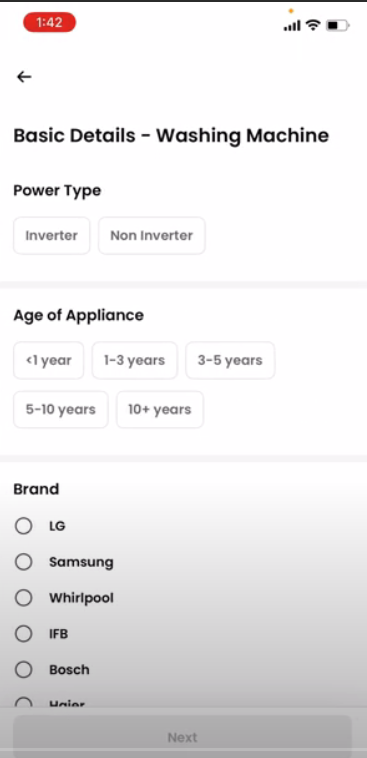
1st Stage- Basic details like age of appliance, Model, Brand etc.
2nd Stage- Power & Function diagnosis for Automatic Washing Machine not turning on condition
3rd Stage- Wash cycle check in Semi/ Automatic Machine
4th Stage- Spin cycle check in Semi/ Automatic Machine
After the 2nd stage partner can now share interim estimate with customer if there's any power/function (machine not turning on) issue found and then complete the diagnosis
There will be cart filtration basis the diagnosis i.e. spin or wash related spares can now only be added in case of spin/wash issue diagnosis.
Along with this, there will be some general/commonly used spares which partner can add in every job after each bucket
Yeh live kyu kiya gaya hai / Is option se partner ko kya fayda hoga?
Verbiages – Dear partner jese app jante hai kabhi kabhi Customer refunds k liye complain raise krte hai ki Job as per the result nhi hui ya fir job krte samay partner s kuch khrab ya damage gya so hum is option ka use krke app se images upload krte hai jo system mein upload or save rehti hai while complain hum usko validate krte hai .
Basic details like age of appliance, Model, Brand etc.
1. Basic Details – Here we have to provide the basis details of the RWM Either it’s a Inverter or Non –inverter
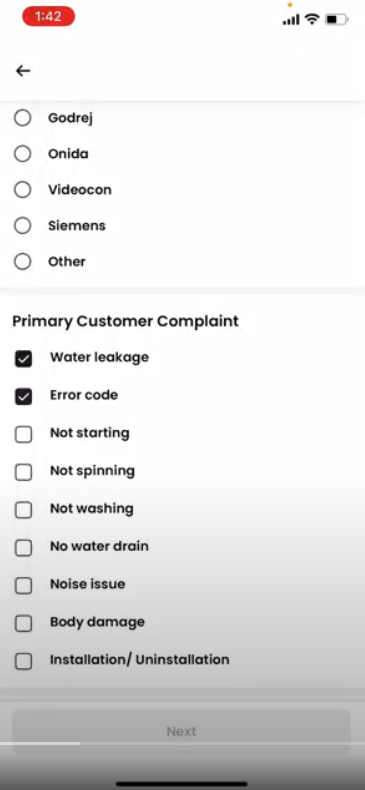
2.Primary Category - Here is the first step toward the knowing the CX problem and Proceed ahead with the isuse where it’s a .
3. Age of Appliance and Brand- Here we need to enter the Age and Brand of appliance in order to check the spare part will be available in market or not.
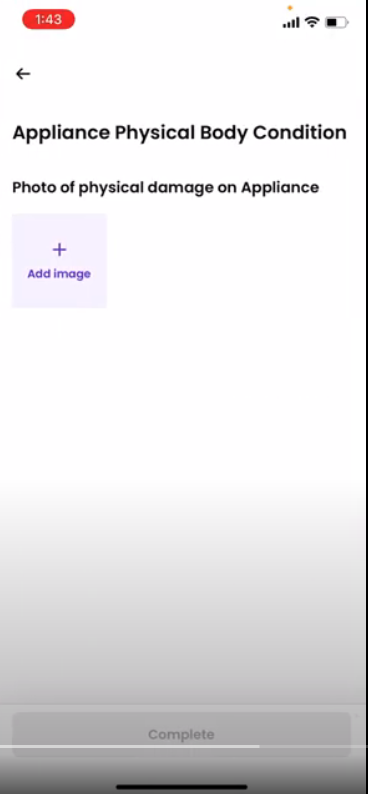
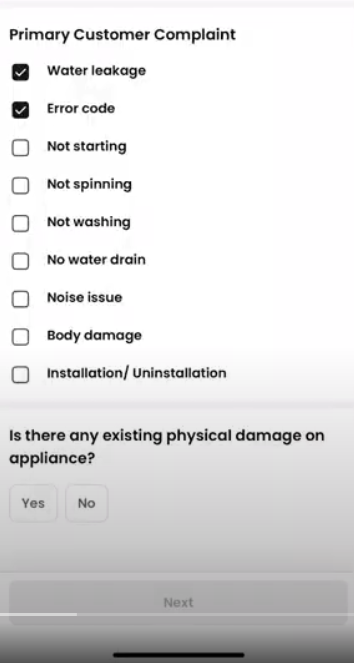
4."If the partner chooses 'Yes', they must upload images of the RWM as evidence of physical damage."
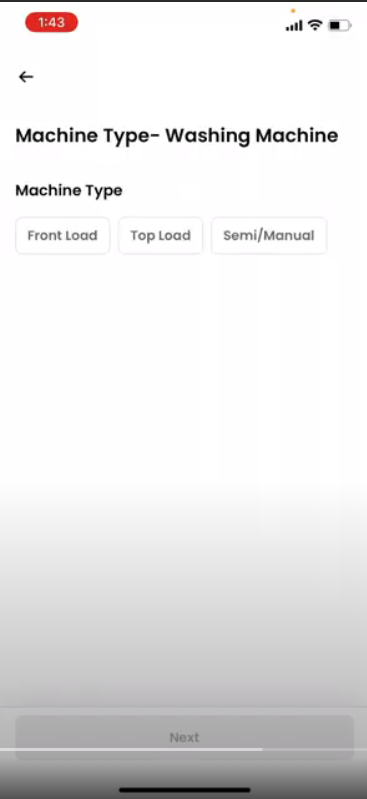
4- Partner have to tell what type of the appliance is Whether it is Front load , Top load , semi manual.
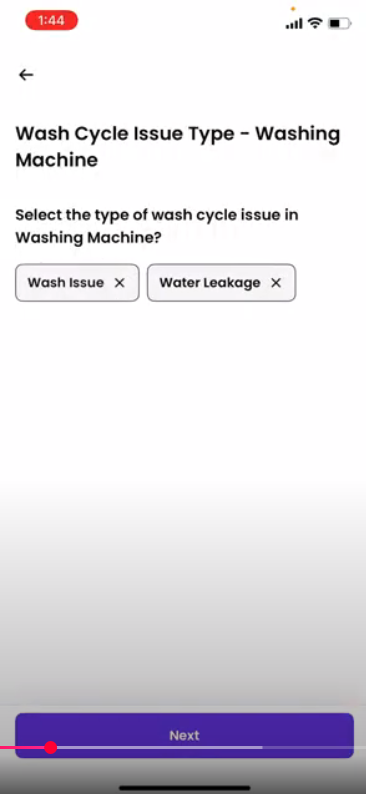
5. Now the partner must provide information regarding the wash cycle issue type, whether it's a wash issue or water leakage."
6. After providing all the information, the partner will be able to view the SKU related to the issue, regenerate the invoice, and proceed with the job."
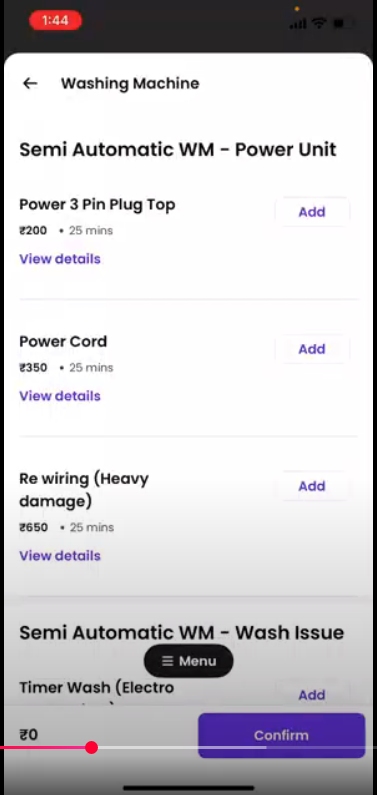
Video to check the diagnostic flow of Washing Machine:
🔹 Diagnosis Flow Scenarios (Based on SOP)
✅ Scenario 1: Machine Not Powering On
Partner Action: During Stage 2, identifies a power issue.
System Behavior: Partner gets the option to share an interim estimate with the customer.
Benefit: Helps manage customer expectations and avoids complaints due to unclear costing.
Verbiage:
“Dear Partner, agar machine power on nahi ho rahi hai to 2nd stage ke baad aapko interim estimate share karne ka option milega. Isse aap pehle hi customer ko estimate de sakte hain, jisse billing clarity banayi ja sake.”
✅ Scenario 2: Wash Cycle Not Working in Automatic Washing Machine
Partner Action: Completes Stage 3 (Wash cycle check).
System Behavior: Only wash-related spares can be added to the cart.
Benefit: Prevents incorrect part usage and spare rejection.
Verbiage:
“Aapne wash cycle mein issue diagnose kiya hai to ab aap sirf wash se related spare parts hi cart mein daal sakte hain. Isse unnecessary rejection aur confusion avoid hoti hai.”
✅ Scenario 3: Spin Cycle Issue in Semi-Automatic Machine
Partner Action: Identifies issue during Stage 4.
System Behavior: Only spin-related spares appear.
Benefit: Simplifies cart experience and reduces errors in part selection.
Verbiage:
“System aapko ab wahi spares suggest karega jo spin se related hain agar aapne spin issue diagnose kiya hai. Yeh aapke liye process ko easy banata hai aur galat spare add karne se rokta hai.”
✅ Scenario 4: Customer Raises Complaint – "Job not done properly"
Partner Action: Uploaded images in each stage of the diagnosis.
System Behavior: Support team validates the job using uploaded images.
Benefit: Protects partner from false complaints or refund claims.
Verbiage:
“Dear Partner, jaise aap jaante hain kuch cases mein customer complain raise karte hain ki kaam sahi se nahi hua. Is feature se jab aap image upload karte hain to hum unhe validate karke complaint ko close kar sakte hain. Isse aapko support milta hai.”
✅ Scenario 5: Partner Adds Spare Not Related to Diagnosis
System Behavior: System restricts spare addition if it’s not relevant to diagnosed issue.
Benefit: Helps avoid spare rejection and returns.
Verbiage:
“System ab sirf wahi spares allow karega jo diagnosed issue se related hain. Agar aap spin diagnose karte hain to wash spare add nahi kar paayenge. Yeh galti se spare rejection avoid karta hai.”
✅ Scenario 6: Partner Unable to View a Required Spare Part
System Behavior:
The system restricts spare addition based on the diagnosis outcome. If the diagnosed issue doesn't match the mapped attribute for the spare, it won't appear in the cart.
Agent Action:
Ask the partner which spare part they are unable to see.
Check the "Spare Group" tab in the sheet linked below to identify the attribute linked with that spare part.
Go to the "Question-Spare Mapping" section in the sheet.
Cross-verify if the questions and options selected by the partner during diagnosis align with the attribute and SKU mapping.
If there is a mismatch, guide the partner to select the correct option as per the sheet so that the desired spare part becomes visible.
Verbiage:
“System ab sirf wahi spares allow karega jo diagnosed issue se related hain. Agar aap spin diagnose karte hain to wash spare add nahi kar paayenge. Yeh galti se spare rejection avoid karta hai. Agar aapko koi spare nahi dikh raha ho to aap diagnosis question mein sahi option select karein as per mapping sheet – tabhi woh spare system mein dikhega.”
Sheet to Refer:
Use the Spare Mapping Sheet to validate the correct spare visibility as per selected diagnosis.